开启WEB功能:
源端:
[dds@www.htz.pw ~]$dds_pweb -s
[dds@www.htz.pw ~]$ps -ef|grep pweb
dds      12064     1  0 03:38 pts/9    00:00:00 dds_pweb -s
dds      12829 11207  0 03:43 pts/9    00:00:00 grep pweb
查看端口号
[dds@www.htz.pw ~]$netstat -anp|grep 12064
(Not all processes could be identified, non-owned process info
 will not be shown, you would have to be root to see it all.)
tcp        0      0 0.0.0.0:8303                0.0.0.0:*                   LISTEN      12064/dds_pweb
我们也可以通过下面的命令来查看
[dds@www.htz.pw ~]$vshms |grep -E 'WEB_PORT|CommP'
        CommParam           : TCP::8203
        WEB_PORT            : 8303
在浏览器中输入http://192.168.111.5:8303/
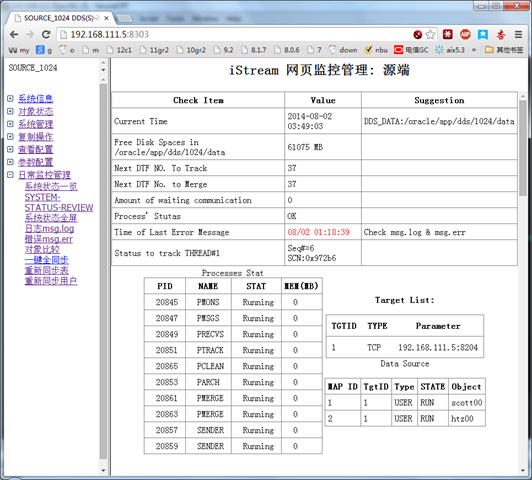
由于基本web的管理不需要输入密码,所以开启WEB管理是相当危险的操作,在不使用的使用建议停掉web管理端口
[dds@www.htz.pw ~]$dds_pweb -q
0802035354[5] OK to stop dds_pweb (pid=12064)
目标端:
[dds@www.htz.pw ~]$dds_pweb -t
[dds@www.htz.pw ~]$netstat -anp|grep pweb
(Not all processes could be identified, non-owned process info
 will not be shown, you would have to be root to see it all.)
tcp        0      0 0.0.0.0:8304                0.0.0.0:*                   LISTEN      14577/dds_pweb
在浏览器中输入http://192.168.111.5:8304/
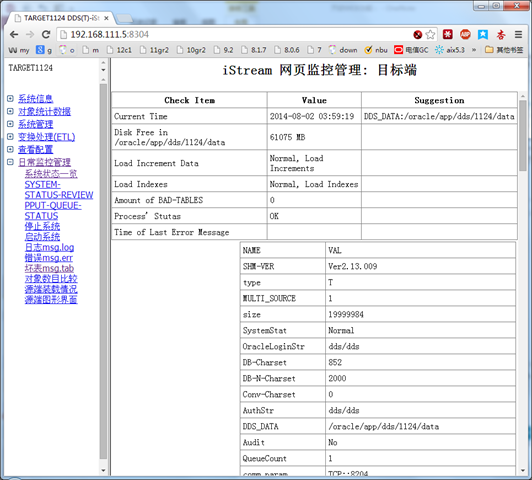
退出web管理端
[dds@www.htz.pw ~]$dds_pweb -q
08/02/2014 04:00:17[5] OK to stop dds_pweb (pid=14577)



DDS 开启WEB管理:等您坐沙发呢!